Display options
Four coins per screen
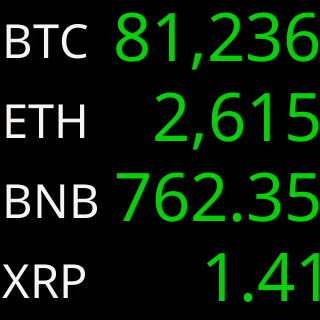
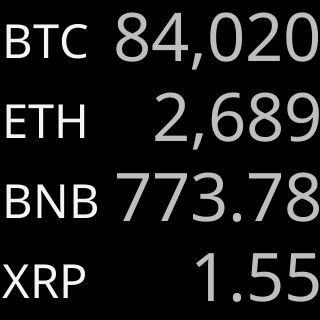
One row per coin, four at a time, in the order of your list: the coin on the left, its price on the right, as large as the row allows. Every picture here is the ticker's own output.
Title Area
Symbol or icon
A row has room for one thing to identify its coin. The symbol is given a readable size first, and the price fits the space beside it.
- No icon yet? The symbol stands in
- No chart and no figures row in this mode
- Set on its own for this mode
Give me the full detailsHide the details
How does Four per screen lay out the screen?
The ticker splits its coin area into four equal rows, one coin per row, filled from the top in the order of your list. The glass is 240 by 240 pixels and the coin area is 236 pixels tall, so each row is 59 pixels. A row holds two things: at the left edge, the coin's symbol or its icon; at the right edge, its price, right-aligned. Both are centered on the row's middle, with at least 8 pixels between them. There is nothing else on a four-coin screen: no title line, no figures, no chart.
Which four coins share a screen?
The ticker groups your coins four at a time in the order of your list: coins 1 to 4 on the first screen, 5 to 8 on the second, 9 to 12 on the third. The groups are fixed, so a coin always shares its screen with the same neighbors while your list stays the same, and with the twelve boxes of the settings page full, the rotation is three screens long. After the last screen it starts again at the first.
If your count does not divide by four, the last screen shows what is left and leaves the rows below it empty; it is never padded with coins from the top of the list. A paused coin leaves the rotation and the coins after it move up a place, so the groups after it change. With four coins or fewer there is only one screen: each time its time runs out the ticker fetches fresh prices and draws it again, and the arrow buttons under the coin boxes are dimmed. Switching Per screen: to Four, or saving your list with Save & Apply Coins, starts again at the first screen.
Why can Four per screen only show the symbol or the icon?
Four per screen shows only the symbol or the icon because a 59-pixel row has room for one name tag beside its price, and the price comes first. A name, or any pair such as the symbol with the name, would take width the price needs, so the Title Area offers two choices in this layout, Symbol and Icon, where One and Two per screen offer five. The factory choice is Symbol.
The ticker holds to the same rule whatever a saved setting says: a four-coin title that includes the icon is drawn as the icon, and any other is drawn as the symbol. The choice is kept separately from One and Two per screen, and a change shows at once, redrawn from the prices already on the screen.
How big is the symbol in each row?
The ticker books a readable size for the symbol before it sizes the price: about 55% of the row's usable height, which on this screen is type 31 pixels tall. The price then gets the width that is left. If a long symbol at that size would leave the price no room even in its smallest type, the symbol gives back one size at a time, on that row only, until the price fits.
Once the prices are settled, each symbol may grow into any spare width, up to the height of its own price and at most the largest title type, 36 pixels tall, but never below the size it booked. Last, the symbols are evened out down the column so that none is more than one size larger than the smallest, which can take a symbol one size under its booking, never more. Symbols are drawn in capital letters, in the colorset's title color. The symbol is booked first for legibility: fitting the price first and giving the symbol whatever width was left would shrink the labels until they could only be read from close up.
What does Icon show, and what if a coin has no icon yet?
The Icon choice shows the coin's logo, 47 pixels square, at the left edge of its row and centered on it. A logo is fixed artwork with nothing to negotiate, so beside it the price always gets the same 185 pixels of width. A coin whose logo is not on the ticker yet, such as a new listing, shows its symbol in that row instead. New logos reach the ticker by themselves with its automatic updates; see a coin shows no icon.
The ticker's fonts carry plain letters, digits and ordinary punctuation. Four marks are drawn as stand-ins: \ as /, ^ as ', { as ( and } as ). A coin whose name and symbol have nothing drawable in them shows its logo even with Symbol selected, and if the logo is missing too, a plain-letter form of the coin's identifier in capitals. In the Amber and Green colorsets the logos are drawn in the set's single color, to match the rest of the screen.
Why are there no figures and no chart in Four per screen?
Four per screen has no figures and no chart because a 59-pixel row holds a name tag and a price and nothing more. The 24h%, volume, market cap and rank need a row of their own under each price, and a chart needs a band of its own, so this layout has neither, and the settings page removes the Price Area and Chart Area sections while Per screen is on Four. A screen of four fetches only the latest figures for its four coins, together, and no price history.
What you give up is the size of each move: the direction still shows in the color of each price, as the up and down section below explains. For the 24h% and the other figures under each price, switch Per screen to Two; for a chart, to One.
Which settings on the page apply to Four per screen?
Four per screen has two settings of its own: the Title Area, whose heading reads "for Four per screen" while this layout is selected, and the time each screen stays, Show Four for:. Everything inside the Global Settings border, such as Market Info, the address card, brightness and the colorset, applies here as in every layout, and the coin list is shared by all three. The figure switches, the V/M prefix, the figure colors and the chart choices stay stored for the other layouts and have no effect on a four-coin screen.
What if two of my coins share a symbol?
Two different coins can share a symbol, and in rows titled by Symbol they would look identical. The settings page warns under the Title Area, naming the symbol: "is shared by two of your coins, with Symbol only they'll look identical. Add Icon to tell them apart." In Four per screen that means choosing Icon, which tells them apart by their logos. The same coin entered twice is allowed and comes around twice as often; if both entries fall in the same group of four, it fills two rows of one screen. More in coins that share a symbol.
How does the ticker size each price in Four per screen?
In Four per screen, each price takes the largest type that fits two limits: the height of its row, and the width left beside the symbol or icon. A row is 59 pixels tall, 57 of them usable, which is room for the ticker's largest price size, 45 pixels tall, so on a four-coin screen width is what usually decides. Beside an icon the price has 185 pixels; beside a symbol it has whatever the symbol's booked size leaves, less an 8-pixel gap. The price type comes in a ladder of sizes, largest first, and the two largest sizes also come in a narrower cut, which a price tries before it drops a size.
A four-coin price can therefore be as tall as the price in One per screen, and taller than a price in Two per screen with its figures on, which is held to 41 pixels to leave room for them. Long prices beside long symbols come out smaller.
Why do the four prices come out so close in size?
The four prices come out close in size because the ticker allows no more than one size step between the smallest and the largest in the column. Each row first finds the largest size that fits it, because a long price really does need smaller type than a short one. Then the column is evened out: the smallest size any row needed sets the pace, and every price larger than one step above it is brought down to that step. The rule only ever moves a price down, so no price is asked to fit a size it does not fit. The reason is the look of the column: without it, a tiny price in small type beside a big one would make one column read like two different screens.
The ticker plans the whole screen before it draws anything: first it sizes every row, then it evens out the prices, and only then does it size the symbols against the prices it settled on, so a price that came down a step hands its width back to the symbol beside it.

Why is there no dollar sign in Four per screen?
Four per screen leaves out the dollar sign because every price on the ticker is in US dollars: on a screen of four rows the "$" would say the same thing four times, and it takes as much width as a digit, twice that of a comma or a point. Leaving it off gives that width to the price, worth about one size step. One and Two per screen have the room and keep their "$".
Why does a price under a dollar start with a decimal point?
In Four per screen the leading zero of a price under a dollar is always dropped, so 0.3263 shows as .3263. It is dropped on every screen and every row, not only when losing it would buy a bigger size: a rule that applied only sometimes would let the same column keep its zeros on one screen and lose them on the next, decided by a coin you were not looking at, while a rule that always applies is one you stop noticing. Prices of a dollar or more have no leading zero and are unaffected.
How does a very small price appear in Four per screen?
A price below $0.0001 is shortened: instead of a run of zeros it shows ".0", then a small number counting the zeros after the decimal point, then up to four significant digits. It is the same form the other layouts use, without the dollar sign and the leading zero. In a four-coin row the count is drawn at about 60% of the height of the digits, so it scales with whatever size the row's price lands on. How the ticker rounds and shortens prices in general is on the One per screen page and in accuracy, rounding and tiny prices.
How fresh are the prices on a four-coin screen?
The ticker fetches the latest figures for all four coins together as a screen comes up, and draws the screen from them; nothing on it is fetched again while it stays up. The next screen brings its own fetch, and with only one screen of coins the same screen is fetched and drawn again each time its time runs out. How often the figures themselves change is covered in how often prices refresh.
How long does each screen stay in Four per screen?
Each screen stays for the time on the Show Four for: slider under the coin boxes: 10, 15, 20, 25 or 30 seconds, 10 seconds from the factory. Two and Four per screen keep separate times, as does One per screen. The slider applies as you move it, and the new time counts from when the screen on the glass appeared, so shortening it can bring the next screen at once. Every new screen means a fetch, which is why 10 seconds is the floor, and since a screen's prices are not refreshed while it stays up, 30 seconds is the longest the ticker leaves one standing. The fetch for the next screen starts a little under half a second before the time runs out, so the time you set is about the time the screen is on the glass.
The arrow buttons under the coin boxes step a whole screen of four back or forward, and the pause button between them holds the current screen for up to 30 seconds, after which it finishes the time it had left. Tapping the small symbol inside a coin's box brings up the screen that holds that coin.
What happens when a price has not arrived?
A coin whose price has not arrived keeps its row: its symbol or icon shows at the left and a dim “-.--” stands where the price goes, sized like the prices beside it, while the other rows show their prices. The screen still gets its full time, and the coin is fetched again the next time its screen comes around.
What comes between screens of four?
When a card from Show Market Info is due, it takes a turn of its own between two screens, and the rotation then carries on with the screen that was next, so no group of four loses its turn. After the round of cards at power-on, cards keep at least 30 seconds from each other and from the address card; see Market Info. The address card from Show my IP address appears as a fresh screen comes up, as a box in the middle of the screen over the middle rows or as a QR code over the whole screen, and when it has had its time the rotation moves on to the next screen; see the address card.
Up and down colors
Each coin wears its own day
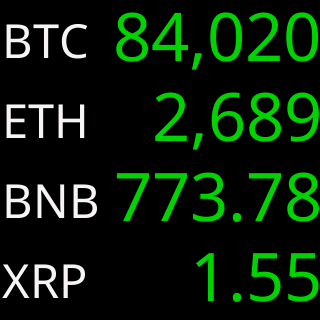
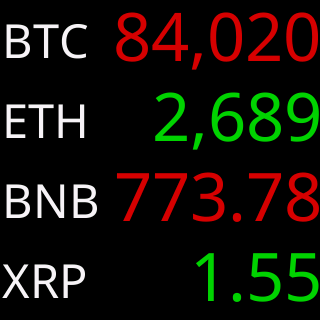
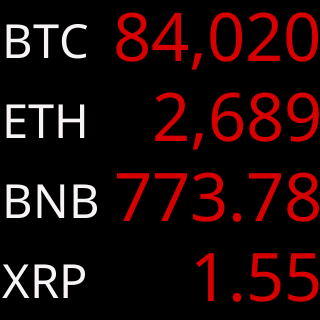
In the Default colorset a price in green rose over the last 24 hours and one in red fell; other colorsets use their own pair. Each row is colored by its own coin, so one screen can hold both.
- A change that rounds to 0.00% shows gray
- The gray is the same in every colorset
Give me the full detailsHide the details
What does the color of each price mean in Four per screen?
Each row's price is colored by that coin's own change over the last 24 hours: the colorset's up color if it rose, its down color if it fell, and a neutral gray if the change rounds to 0.00%. The 24 hours are rolling, counting back from now, never since midnight. Only the prices carry the color. Symbols are drawn in the colorset's title color and icons in their own artwork colors, so the left-hand column looks the same whatever the market does.
How can one screen show both up and down coins?
The ticker judges each row on its own, from that coin's own 24 hours, so any mix can share a screen: four up, four down, or anything between. A screen of four is four separate readings, not a verdict on the group or on the market. For the market as a whole, the Market overview card between screens shows the total value of all coins and how it moved over the same 24 hours; see Market Info.
Why is there no percentage beside the price?
Four per screen does not print the 24h% at all, because a 59-pixel row holds a name tag and a price and nothing more. The color is the only sign of direction on this screen, and the size of each move is not shown. To see the percentage under every price, switch Per screen: to Two; see the figures in Two per screen.
When is a row gray if the percentage is not shown?
A row is gray when its coin's 24-hour change rounds to 0.00% at two decimals, which is a move of less than 0.005% either way. A row is gray, too, when CoinGecko has no 24h figure for that coin at all. The ticker applies the same rule it uses where the percentage is printed, so a gray row in Four per screen means exactly what 0.00% means in One or Two per screen, even though the digits are not on the glass. The gray is the same light gray in all ten colorsets, and no colorset uses gray for up or down; the reasoning behind a third color is on the One per screen page.
How do the colorsets show up and down across four rows?
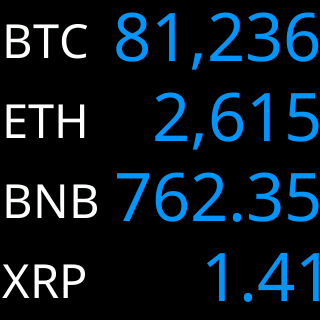
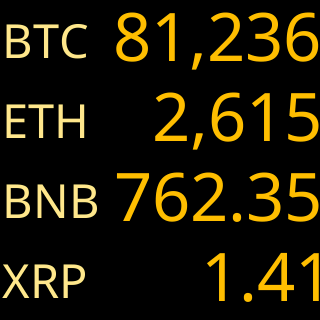
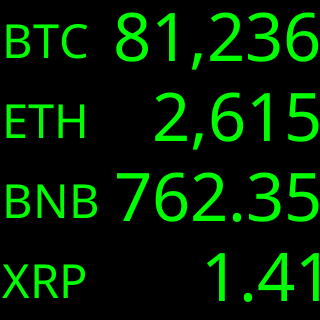
With color as the only cue, the colorset's pair does all the work in this layout. Default uses green for up and red for down, and Colorblind uses blue for up and yellow for down. Amber and Green imitate a single-color monitor: up and down are a brighter and a darker shade of the same color, and the icons are drawn in that color too, so there the direction is told by brightness alone. The colorset is chosen on the Global settings page and applies to every layout at once.
Can I change the colors in Four per screen?
Four per screen has no color settings of its own. The prices follow the colorset's up and down pair, the symbols use its title color, and the color swatches for volume, market cap and rank belong to the Price Area, which this layout does not have. Choosing another colorset recolors every layout at once, and on the Global settings page the Colorset section shows this four-coin screen in all ten when you pick Four per screen.
Does a row change color while the screen is up?
A row does not change color while its screen is up. The ticker fetches the four prices and their 24-hour changes together as the screen comes up, colors each row then, and keeps those colors for the screen's whole time. The next screen of four is fetched and colored afresh, so a coin can come back a different color on its next turn. A row whose price has not arrived shows no price, and so no color either.
Also on the settings page
The rest of the settings
The Market Info cards between screens, the address card, brightness and quiet hours, and the ten colorsets are on the Global settings page. How long each screen stays, the progress bar, date and time, and what a touch does are in the settings reference.