The setup page did not open by itself
- Phone joined the CT network but nothing opened
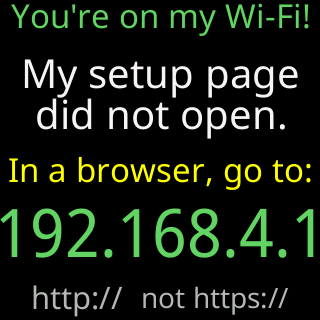
- Glass shows `You're on my Wi-Fi!` and `If not, browse to:` with `192.168.4.1`
- Glass shows `My setup page` / `did not open.`
Symptoms
Your phone or computer is on the CT network, the ticker’s screen says You're on my Wi-Fi!, but no setup page has appeared. The screen may add My setup page / did not open. and In a browser, go to: above the address 192.168.4.1.

Cause
Phones open the page by asking a new network “is there a sign-in page here?”; the ticker answers yes and hands over its page. Some phones, the glass names Samsung, show a notification instead of opening a window; Windows laptops often show nothing at all; and a device that has joined the CT network before may skip the check. The page is always there at 192.168.4.1; only the automatic opening varies.
Fix
- Look for a notification such as “Sign in to network” on the phone and tap it.
- If there is none, open your browser and type
http://192.168.4.1into the address bar. The setup page opens; the glass changes toDoing great!. - If the browser says the address cannot be reached, check that the device is still on the
CTnetwork (phones drop a network with no internet quickly) and rejoin it, then try the address again. - If the page still does not load, restart the ticker (unplug it and plug it back in), wait for the
Join my Wi-Ficard, rejoin theCTnetwork and try again. The Help panel’s own words:Still stuck? Restart me, rejoin my setup network (it's called CT followed by three numbers) and try again.
If that didn’t work
-
After about 90 seconds on the
CTnetwork with no page, the glass showsScan to open my pagewith a QR code: scan it with the phone’s camera to open the page.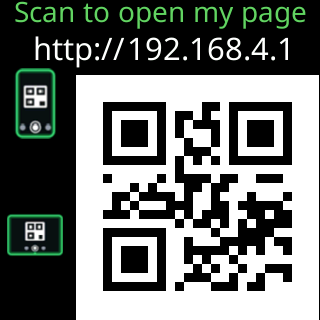
-
The phone keeps leaving the network: My phone keeps leaving the setup network
-
Still stuck: Contact