Automatic firmware updates
What it shows
Nothing, most of the time. The ticker checks for newer firmware about five minutes after it starts and then about once an hour, and a check that finds nothing newer is silent. Only a check that finds a newer version changes the screen.
When there is a newer version the ticker first shows its two health cards, the Wi-Fi signal and the power supply, with a bottom line of All good, updating now or Not great, updating anyway. In the first minutes after power-up the power card has no verdict yet and says Still measuring, updating now. Then the update screen takes over.

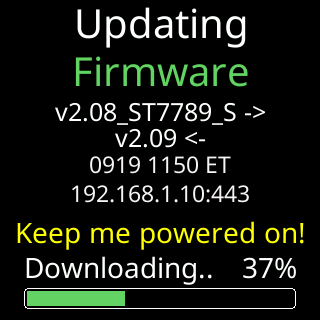
The download screen carries Updating / Firmware, the version pair, Keep me powered on! in yellow, and two dim rows naming the file’s build date and where it is coming from. Under them a phase label, a percentage and a progress bar run while the file arrives and is checked.
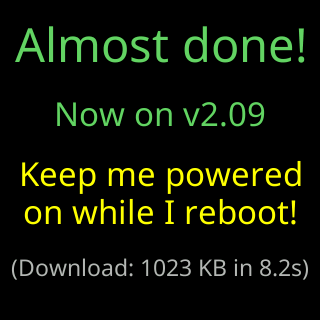
Almost done! closes it: the version now installed, Keep me powered / on while I reboot!, and what the download cost, for example (Download: 1023 KB in 8.2s). The card stays up for seven seconds; two-thirds of the way through, a bar appears and sweeps across the bottom. Then the screen goes dark for about as long while the arriving image is moved into place, and the ticker restarts. When the release brings new coin artwork, about half an hour later the ticker shows New artwork, fetches about 1.8 MB of logos and restarts once more. See Icon updates.
The ticker refuses any file that does not pass its check: an interrupted or corrupted download is discarded and the current firmware keeps running. The power reading covers the download itself, so a supply that sagged under it can bring the power card up afterwards. What can go wrong is on A firmware update didn't finish.
Options
- None on the settings page. Updates are automatic and cannot be switched off by an owner; there is no check-now button either. A check runs by itself within an hour of any change on the server.
- Weak signal postpones a download: below the update line the ticker shows
Signal too weak/Postponing update.and tries again at the next hourly check, up to ten times, after which it updates anyway. See Update postponed because the signal is weak.
Where to set it
There is nothing to set. The firmware version you are on is at the top right of the settings page, Firmware:. See Which firmware do I have?.