Features at a glance
What it shows
Coins
- Up to twelve coins from the 1,000 largest, chosen by name or symbol on the settings page. Choosing coins
- Fill all twelve from the market’s top coins in one tap. Load top coins
- One, two or four coins per screen; each layout keeps its own timing and style. One, two or four coins per screen
- Pause a coin without removing it; jump to a coin; a remote with previous, pause and next. Pausing coins, Jump to a coin and the remote buttons
The screen
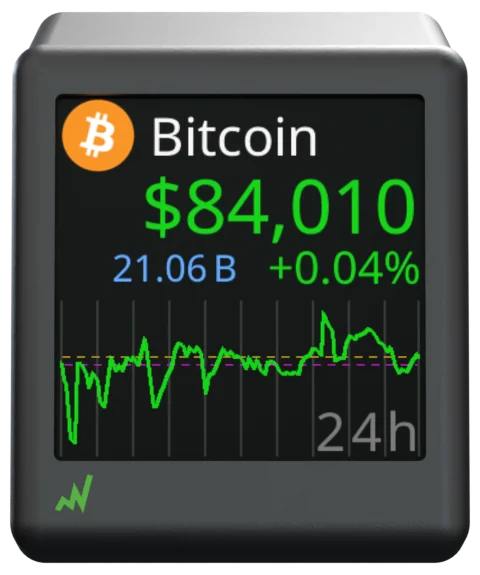
- Title with logo, symbol or name; a price colored by the day’s direction; volume, market cap, rank and 24h change. Title area, Price area
- Charts over 24h to 90d, several per coin, with a movable range label and optional helper lines. Charts and time ranges
- Ten colorsets including a colourblind one, custom stat colors, brightness, and quiet hours that dim at night. Colorsets, Brightness, Nighttime quiet hours
- Market overview and sector heat cards between coins. Market info cards
The settings page
- Served by the ticker on your Wi-Fi; no app, no account; every change applies at once. A tour of the settings page
- Export and import your setup as a file; an optional password; twelve page themes. Export and import settings, Lock the settings with a password
Wi-Fi and updates
- Setup from any phone, tablet or computer in minutes; change networks later without losing settings. Quick start, Change to a different Wi-Fi network
- Firmware and coin-logo updates arrive by themselves. Automatic firmware updates
On its own
- Tells you in plain words what it is doing, from setup to an outage. What the screen is telling me
- Checks its own Wi-Fi signal and power supply and says when either needs a look. The Wi-Fi signal check, The power check
- Keeps a backup copy of your settings, recovers from faults, and reports its health. Settings health and the backup copy, Restarts the ticker does by itself
Options
Every feature is on by default or one tap away on the settings page; there is nothing to install.
Where to set it
The settings page: Opening the settings page.