Settings health and the backup copy
 9:41192.168.1.107
Two copies
The ticker keeps a backup copy of your settings and checks both copies at every start. A damaged working copy is restored from the backup, and only if both fail does the ticker fall back to the starter set of coins and shipped settings.
The Health status card
The card appears once, at start-up, only when the check found something you should know.

Four texts:
| The card says | What it means |
|---|---|
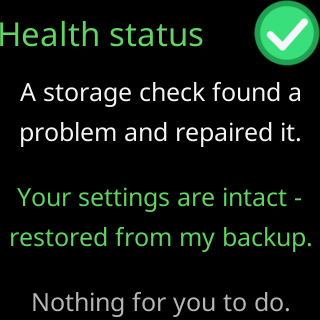
A storage check found a / problem and repaired it. / Your settings are intact - / restored from my backup. / Nothing for you to do. |
the working copy failed and the mirror stood in |
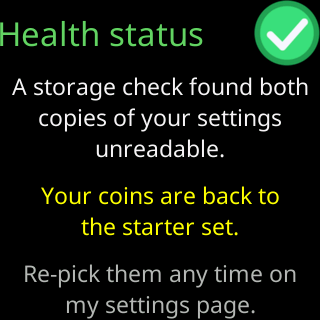
A storage check found both / copies of your settings / unreadable. / Your coins are back to / the starter set. / Re-pick them any time on / my settings page. |
both failed and your coin list is gone |
Both copies of my / settings storage failed / their check. / Your coins look intact. / Check my settings page / to be sure. |
both failed their check, but the coin list read back sensibly |
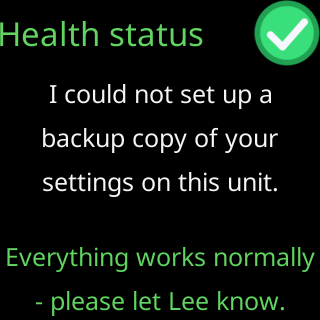
I could not set up a / backup copy of your / settings on this unit. / Everything works normally / - please let Lee know. |
the mirror could not be written; the ticker runs on one copy |
A mirror rebuilt from a good working copy, and a clean check, show no card.
The Settings copy line
The settings page’s footer shows a Settings copy line only when there is something to say. Its phrases: verified OK, backup rebuilt, restored from backup, no backup available, fresh after upgrade (a ticker that arrived on v2 from v1 has no mirror until its first save), and reset to defaults.
What you can do
Nothing is required after a repair. If the card said your coins are back to the starter set, pick them again on the settings page, or load a file you exported earlier: Export and import settings. If the card asked you to let Lee know, see Contact.