Nighttime quiet hours
 9:41192.168.1.107
What it shows
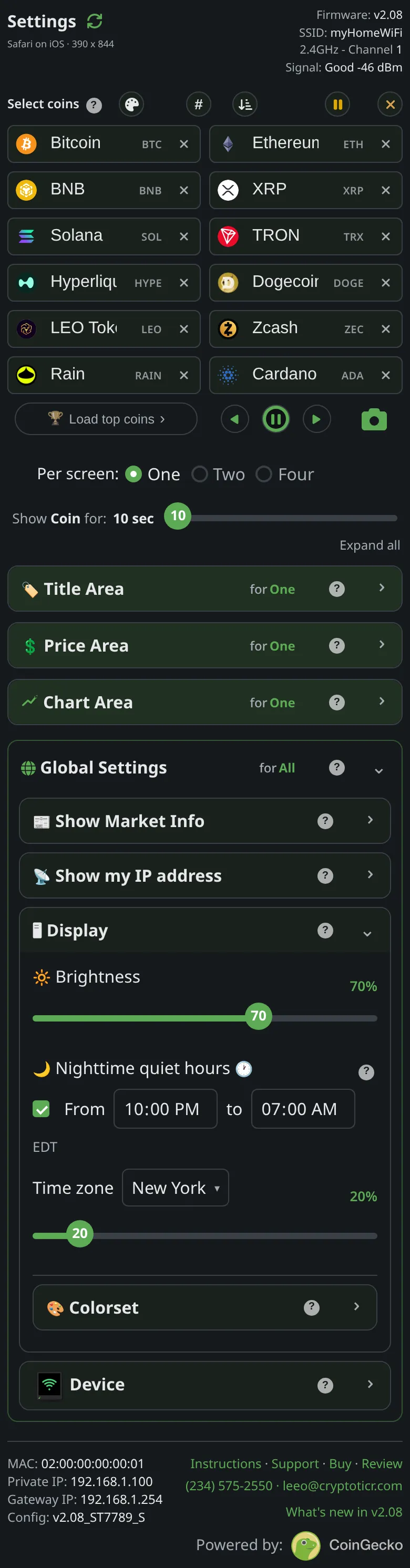
Between the From time and the to time the ticker runs at the night level, set with the slider under the times, instead of the daytime Brightness. The page’s description: Dim the ticker between two times, then bring it back. Handy on a bedside table or a desk you sit at in the evening. Both levels apply the moment you change them.
The window is checked every second against the local time the ticker works out from its server’s replies and your time zone. Crossing midnight is normal: ten in the evening to seven in the morning is one stretch. Setting both times the same means never dim.
Quiet hours stand down, and the ticker returns to the daytime level, whenever it cannot trust the time: it has no clock of its own, and after a day without a reply from its server it stops guessing. They also stand down during a firmware update and in setup mode.
Options
- A switch for the feature,
Fromandtotimes, the time zone row, and a slider for the night level from ten to a hundred in steps of ten. That slider has no label of its own, only its percentage at the end of the time zone row; the page’s help calls it theNight level. - A night level above the daytime level is allowed; the page marks it
brighter than daytime. - The time zone is taken from your phone or computer the first time the page opens, and can be changed in the row under the times; see The time zone and how the ticker knows the time.
Where to set it
Display → Nighttime quiet hours. Reference: Setting: quiet hours on or off, Setting: quiet hours start time, Setting: quiet hours end time, Setting: night level, Setting: time zone.