What the screen is telling me
Find the words you are looking at on the glass, and this says what they mean and where the full explanation is. The wording in code is exactly what the ticker prints. The groups follow what the ticker is doing at the time.
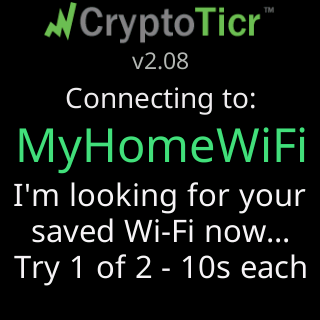
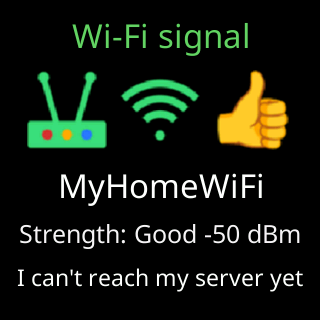
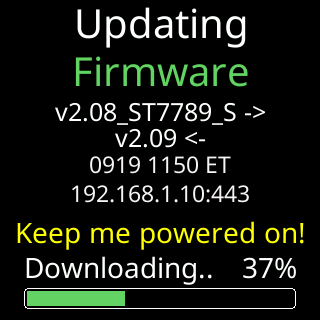
If you would rather see the screens than read them, each group’s own page has a picture of every card. One from each group, to show the range:

Setting up, before the ticker is on your Wi-Fi
| On the screen | What it means | Read more |
|---|---|---|
Let's get me set up / on your home Wi-Fi |
a new ticker’s first screen | Screen messages during setup |
For help..., The steps:, Join my Wi-Fi, Scan to join Wi-Fi |
the setup cards, on rotation | The setup cards on the glass |
Power / My USB power is / very low right now. |
the supply is in the danger band | The power check |
Heads up / Your Wi-Fi refused me / I'll retry by myself |
setup opened because the router refused the saved password; it retries by itself in 15 minutes | Glass says: Your Wi-Fi refused me |
Heads up / I can't find your Wi-Fi |
setup opened because the saved network could not be reached | The ticker opened its setup network by itself |
Heads up / Fixed it on the router? or Wi-Fi working again? / Restart me once. |
the Heads up card’s second showing each lap: restart the ticker once if the problem is fixed | The ticker opened its setup network by itself |
You're on my Wi-Fi! |
a phone or computer has joined the setup network | Join the ticker's setup network |
Scan to open my page |
the setup page has not been opened; this code opens it | The setup page did not open by itself |
Doing great! / On that page, pick / your Wi-Fi network. |
the setup page is open and waiting for a network | What the glass shows while joining |
Got it - thanks! / Connecting to: / Logging in... |
joining the network you chose | What the glass shows while joining |
No luck yet. / Trying again (2 of 3) |
a try failed and another is starting | What the glass shows while joining |
Status report: |
the join worked, and this is what it could reach | What the glass shows while joining |
Can't get online / Answer on your phone. |
the ticker joined a network with no working internet and is asking whether to use it | Setup says it can't get online |
You're all set! / My IP Address |
setup is done, and this is the settings page’s address | Find the settings page after setup |
Wi-Fi joined. / My IP Address / Can't get online. |
the ticker is using a network without internet, as asked | Setup says it can't get online |
Don't give up! / Try again / on my setup page: |
two tries failed; this is the way back in | Screen messages during setup |
What happened, Let's try again., Tech tip, Also worth trying |
the cards that rotate after a failed join | Screen messages during setup |
No activity / Restarting for a fresh start |
nobody used the setup network for 15 minutes | Setup restarted for a fresh start |
Your Wi-Fi is back! / Reconnecting... |
the missing network reappeared in a scan | The setup network |
The verdict after a failed join
| On the screen | Read more |
|---|---|
The password was refused. |
The password was refused |
The router turned me away. |
The router turned me away |
I can't see that network. |
My Wi-Fi network is not in the setup page's list |
The router says it's full. |
The router says it's full |
No address was given to me. |
No address was given to me |
Joined, but my server is quiet. |
Setup says it can't get online |
The signal here is very weak. |
The signal here is very weak |
I lost sight of the router. |
I lost sight of the router |
Nothing came back. |
Nothing came back when I asked to join |
It failed and didn't say why. |
It failed and didn't say why |
Wi-Fi: starting up, waiting, changing
| On the screen | What it means | Read more |
|---|---|---|
Connecting to: with the network’s name, I'm looking for your / saved Wi-Fi now... |
every start-up begins here | What happens when the Wi-Fi drops |
I've logged in!, Your router gave me / this address to use: |
a start-up that worked | Screen messages about Wi-Fi |
That fixed address / isn't working. |
the fixed address you set does not reach anything | Give the ticker a fixed address |
Trying to connect, Waiting for Wi-Fi, Wi-Fi answered, Almost connected |
waiting for the saved network, with what it knows so far | Glass says: I can't find your Wi-Fi |
It's there. I can't join yet. |
the router is on and answering but the ticker cannot get on | Glass says: Your Wi-Fi refused me |
Wi-Fi rejected my password / Did the password change? |
the router is refusing the saved password | Glass says: Your Wi-Fi refused me |
Weak Wi-Fi signal / Poor Wi-Fi signal. |
too far from the router to join | The signal here is very weak |
New Wi-Fi? Restart me / 5 times fast. Wipes me. |
the waiting screen’s footer offering the way out | Factory reset by switching it off and on five times |
I couldn't connect. / About to restart & try again., One more try... |
a setup that never finished, retrying | The ticker keeps restarting to reach my Wi-Fi |
Changed your Wi-Fi?, New password? or New Wi-Fi router? / Restart me / 5 times fast to set it up. |
the yellow hint between start-up retries | The ticker keeps restarting to reach my Wi-Fi |
Looking for Wi-Fi / Is it on? |
the network dropped while the ticker was running | What happens when the Wi-Fi drops |
Looking for that network nearby..., Connect attempt / 1 of 3..., Connected! / My new address:, Couldn't switch |
a change started from the settings page | Change to a different Wi-Fi network |
Saving this network... / Saved. Leaving this network now. |
a network saved for somewhere else | Save a network for another place |
Reconnecting WiFi... with a code line |
the radio is rejoining | Screen messages about Wi-Fi |
Data and the server
| On the screen | What it means | Read more |
|---|---|---|
My server says: wait., My server's having trouble., Rejoining your Wi-Fi..., Waiting for an address..., No internet yet., Is your internet working?, Redo setup: 5 fast restarts. |
the start screen waiting for a go-ahead | The start screen says it is waiting, retrying, or rejoining |
Something here blocks me. / I can't get past this network. |
something on the network answers in the server’s place | Glass says: This network is blocking me |
I can't get through / to my server. |
the start-up test could not reach the server | Screen messages about data and the server |
The server says: |
the go-ahead itself, in the server’s own words | Screen messages about data and the server |
Retry 1 of 3 |
a small pill over the coins while a fetch is retried | Glass says I can't see my server |
I can't see my server / Trying again in ~8s |
the outage box, with what it measured | Glass says I can't see my server |
Wi-Fi refused., Wi-Fi down., No IP address from router. |
the outage box’s first line: the router is turning the ticker away, the link is gone, or the router gave no address | Glass says I can't see my server |
a code such as -1: Connection failed with Trying again shortly... |
one fetch failed | Screen messages about data and the server |
Heavy Server Load |
the server asked the ticker to slow down | Prices stopped updating |
Too fast, Easing off, No reply, Updating... (202), Busy (429), Reply cut off under a price of -.-- |
why that one price is missing | Prices stopped updating |
Tidying my memory |
the ticker paused fetching to free memory | Screen messages about data and the server |
Your internet looks down, The trouble is at our end, Your Wi-Fi is fine, it's our end, Try moving it closer, I can't reach my server yet |
the signal card naming which part is at fault | Glass says I can't see my server |
Power and signal
| On the screen | What it means | Read more |
|---|---|---|
Weak Wi-Fi signal, Wi-Fi drops out, Wi-Fi signal with Strength: |
the signal card | The Wi-Fi signal check |
Power a bit low, Power very low!, Power a bit high, Power very high!, Power is good, Measuring power... |
the power card | The power check |
Updates
| On the screen | What it means | Read more |
|---|---|---|
Checking for / firmware... |
a check somebody asked for | Screen messages during updates |
Updating / Firmware / Keep me powered on! |
a firmware update is downloading | Automatic firmware updates |
Almost done!, Now on with the version, Keep me powered / on while I reboot! |
the update finished and it is restarting | Automatic firmware updates |
I'll try again in |
an attempt did not complete; the next is scheduled | A firmware update didn't finish |
Update paused, Update failed, Firmware update / didn't finish., Server problem, Can't reach server |
the ways an update can stop | A firmware update didn't finish |
Already current / No newer firmware. |
an asked-for check found nothing | Screen messages during updates |
Signal too weak / Postponing update. |
the signal is below the line updates need | Update postponed because the signal is weak |
New artwork, Updating / Icons, New icons, Icons updated!, Icons not ready yet |
the coin artwork pack | Icon updates |
New firmware! with a version badge and (reload browser page) |
after a major update | After an update |
Restarts and recovery
| On the screen | What it means | Read more |
|---|---|---|
Looking good! / Starting up... |
the first start after setup | The first run on the glass |
Wi-Fi saved. / Starting up... |
the first start after setup on a network chosen without internet | The first run on the glass |
Restarted to reconnect / to your Wi-Fi, Restarted to refresh / my server link, Restarted to refresh / my memory, Restarting... |
why the ticker restarted itself | The ticker restarts by itself |
Freeze recovery, Glitch recovery, Glitch 2 |
it recovered from a fault | The ticker restarts by itself |
I cleared my memory, I restored my defaults., I refreshed my icons., I started over fresh., Your Wi-Fi is safe. |
what a repeated fault made it do | The ticker says it started over fresh |
Crash report data / Scan and send to Lee |
a QR code holding the technical record | A Crash report card with a QR code appeared |
red circles with 2 more quick reboots / for factory reset, Factory Reset, Factory Reset Done |
the five-restart reset, in progress | Factory reset by switching it off and on five times |
Health status |
the settings storage was checked, and what came of it | A Health status card appeared at start-up |
The address and the settings page
| On the screen | What it means | Read more |
|---|---|---|
My settings are here: with an address |
on the start screen, every time | Opening the settings page |
Open a browser. / Enter into its / ADDRESS BAR: / Not a search box! |
the address, spelled out for a computer | Find the settings page after setup |
Scan for my settings |
the same address as a QR code | Find the settings page after setup |
Nicely done! / Let's catch / the next move. |
the first-run celebration | The first run on the glass |
You're in settings! / Pick your coins, / hit Save, and / I'll get to work! |
you opened the settings page for the first time | The first run on the glass |
My settings are here: with the address, or the address as a QR code |
the scheduled address popup | The address popup and QR code |
IP > 192.168.1.42 |
the ticker’s own address changed | I lost the ticker's address |
Server reassigned, I can now see my / server's API again: |
small notes about our server; nothing to do | Screen messages about the address and settings |
Password setup code with four digits |
you are setting the settings password | Lock the settings with a password |
two blocks labeled Up and Down with a colorset’s name |
the colorset changed | Colorsets |
| a small ring counting down in a corner | the screen is paused from the settings page | Pause from the page |