Support
Read the screen first
The ticker says what it is doing in plain words, and every message it can show has a page. Start at What the screen is telling me, find the words on the glass, and follow the link. Most calls are about Wi-Fi, and these are the two screens behind them:

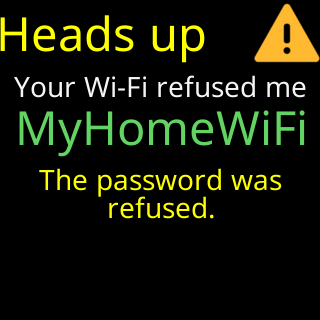
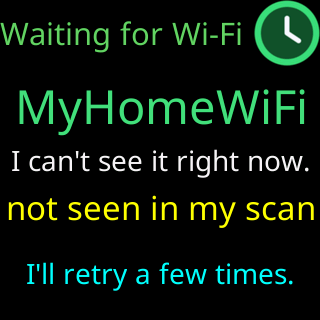
The most common starting points:
- Setup will not finish: Screen messages during setup and The CT setup network is not in my phone's Wi-Fi list.
- The Wi-Fi is refusing it: Glass says: Your Wi-Fi refused me, Glass says: I can't find your Wi-Fi.
- Prices stopped: Glass says I can't see my server, Prices stopped updating.
- The settings page will not open: The settings page won't open, I lost the ticker's address.
- It restarted by itself: The ticker restarts by itself.
- Starting over: Factory reset.
Every problem page on this site is listed at /problems/, and every question at /faq/.
Before you call
Three things answer most questions at once: the exact words on the screen (a photo is best), the Firmware: line at the top right of the settings page, and the line under Settings that names your browser. The full list is on Before you call: what to have ready.
Reaching Lee
Call or text (234) 575-2550, or email leeo@cryptoticr.com. Lee designed the ticker and wrote its firmware; the store can only process returns. Details, and the warranty and returns pages, are on Contact. Bugs and ideas: Report a bug or suggest a feature.