The screen is dark or looks off
- The screen is black
- The screen is very dim
- It went dark in the evening
 9:41192.168.1.107
Symptoms
- The screen is black, or so dim it looks off, while the cable is connected.
- It went dim at a particular time of day and came back later.
Cause
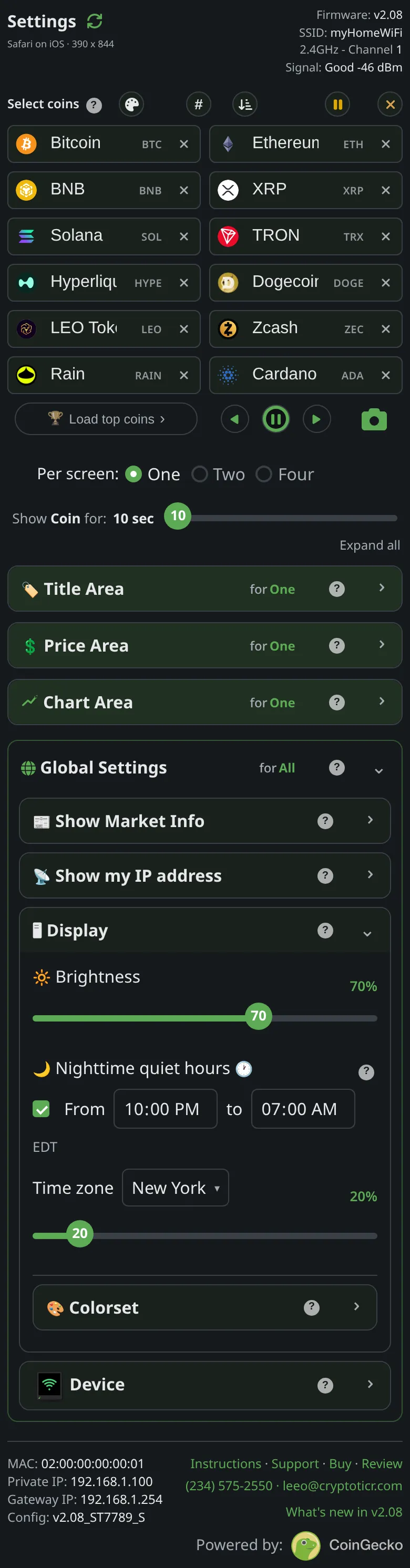
Three possibilities. Quiet hours are on and the night level (the slider under the From and to times) is low: the ticker dims between the From and to times. Or the Brightness slider is at its lowest step, ten percent, which is dim but never off. Or the ticker has no power: a switched-off cable, a dead adapter or an asleep USB port. The firmware never turns the backlight fully off on its own, so a truly black screen with the ticker running is unusual.
Fix
- Look closely in a dark room. A faint image means the backlight is low, not off: open the settings page and check
Brightnessand, underNighttime quiet hours, the times and the slider under them, which sets the night level. - No image at all: check the switch on the cable and try another USB source. See Power and the USB cable.
- Still nothing with a known-good source: restart it by unplugging and replugging. The start screen should light within a few seconds.
If that didn’t work
- The screen lights on the start screen and then goes black: contact Lee with what the start screen showed. See Contact.
- It is bright by day and dark at night when you did not want that: The screen got brighter at night covers the opposite case, and Quiet hours come at the wrong time the timing.