Power and the USB cable
The socket and the cable
The power socket on the back of the ticker is USB Type-C. The box holds a cable with a USB-A plug at one end, USB-C at the other and an on/off button in the lead, and a 110 V power adapter with a USB-A socket.
The adapter is a convenience. Any USB port that stays powered, on a computer, a TV, a hub or a phone charger, gives the ticker what it needs. A port that switches off when its computer sleeps switches the ticker off too.
How much power
About 0.2 amps at 5 volts, which is about one watt. It is built to stay on, day and night.
The button on the cable is the only switch. There are no buttons on the ticker itself.
The ticker measures its own supply
The ticker reads the voltage reaching it many times a second and judges it over each minute, so a single blip never counts. When the supply sags, from a thin or very long cable, a tired adapter, or a port shared with hungry devices, it shows Power a bit low or Power very low!. When it runs high, it shows Power a bit high or Power very high!. While it is fine, the power card reads Power is good.

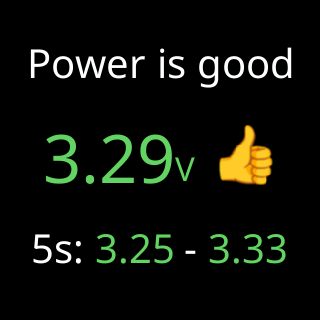
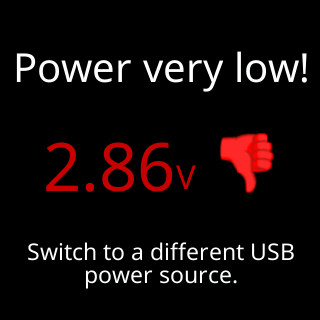
The very-low and very-high readings matter more than a warning. At those levels the ticker can restart without warning, or damage its stored settings while it saves them. That is why the card’s advice is a different power source, not a different setting: for very low, Switch to a different USB power source.; for very high, unplug it and use a different one.
During first-time setup a supply in that danger range shows a Power card among the setup cards. The whole feature is on The power check.
After a power cut
The ticker starts by itself when the power comes back, rejoins the Wi-Fi and carries on, with nothing lost. See After a power cut.