After a power cut
The ticker is faster than the router
After a power cut the ticker is back on in a few seconds; most routers take a minute or more. So the ticker’s first two tries, ten seconds each, under Connecting to: and your network’s name, usually find nothing. That is expected, and the ticker is built for it. The setup page’s Help says so: I come back faster than most routers. If I can't find your Wi-Fi straight away I'll wait and restart myself until it's back, nothing for you to do.
What you see
The waiting screen: Trying to connect or Waiting for Wi-Fi, the network’s name, No answer yet. I keep trying. or I can't see it right now., and a footer that rotates I'll keep retrying., I retry every 15 seconds, / restart every 2 minutes., New Wi-Fi? Restart me / 5 times fast. Wipes me. and any evidence the router has sent. Ignore the restart hint after a power cut: it is the factory reset. Every two minutes the ticker restarts, the screen goes back to Connecting to:, and tries again.

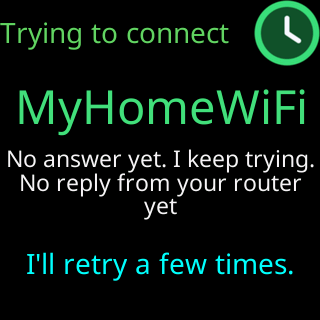
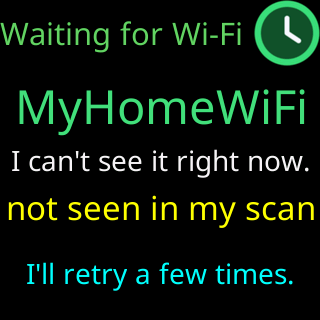
The moment the router is up, a try succeeds and the ticker continues with I'm logging in using, my saved password... (I'm logging in... on a network with no password), I've logged in!, the address, and then the coins. Nothing needs to be pressed.
Restarting it yourself
Unplugging and replugging the ticker during this wait is harmless, each restart is one more try. Two things to know:
- Switching it off and on five times in quick succession, each within five seconds of power-up, is the factory-reset gesture, and it erases the ticker’s settings and Wi-Fi. A restart after the waiting screen has been up for more than a few seconds does not count toward it. See Factory reset by switching it off and on five times.
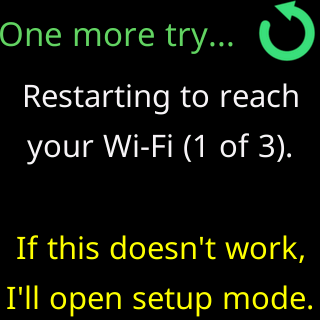
- A ticker that has never completed setup shows a different story after a failed start,
One more try...andRestarting to reach,your Wi-Fi (1 of 3)., and opens its setup network after three restarts. That ticker was mid-setup when the power went; finish its setup as on day one.
Power cuts and the power itself
If a power card such as Power a bit low or Power very low! appears after the mains came back, the supply is sagging; see The power card says low or high.