Office and corporate Wi-Fi
Two different problems
Networks with a username. A network that signs you in with a username and password (the kind IT departments run) cannot be joined at all. The ticker has no way to enter a username, and the setup page says so: This network wants a business style sign in with a username, and I have no way to type one. Please use a normal home Wi-Fi or a phone hotspot instead.
Networks that are locked down. A workplace network the ticker can join may still stop it reaching its price data, in ways that vary from office to office and that nobody can see from the outside. The setup page’s Help panel puts it plainly: Anywhere with real IT staff, the network is locked down in ways you can't see, and it varies enormously. Even on the main network something may quietly stop me reaching my price data, and there's no way to tell in advance.
What the ticker can tell you
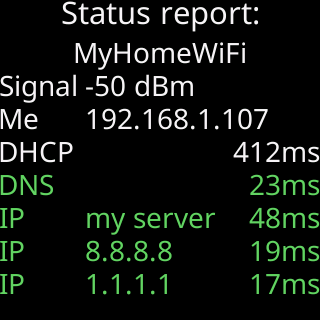
After joining, the ticker checks whether it can reach its own server and two public addresses on the two ports it uses. The Status report: on the glass shows each as green, orange or red, and when its server is out of reach, or a sign-in page answered in its place, it adds one line naming the shape of the block: 443 fails here, 80 works. (secure traffic blocked), My name fails here. (the name lookup is filtered), A sign-in page blocks me. or No internet here. That line is what to show whoever runs the network, if you ask them to make an exception. When a sign-in page is in the way, the name lookup fails, or nothing on the internet answers, the setup page then asks whether to use the network anyway (Use it anyway) or pick another (Pick another Wi-Fi). Nothing is saved unless you tap Use it anyway, or nobody answers within 3 minutes.

The honest advice
Getting an exception for a crypto ticker is rarely worth the trouble. The Help panel says: Take me home and I'll have a proper chance. Home routers are what I'm built for. Not sure? Call or text Lee and he'll tell you straight. A phone hotspot on your desk is the other way: Using a phone hotspot.