The crash report card
When it appears
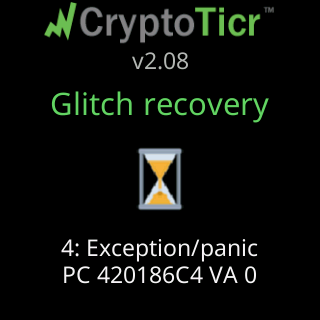
On the start screen after a fault that left a record, once the ticker has shown its Glitch recovery or Freeze recovery lines and the technical row under them.


The QR card holds for a minute, with a thin green line counting it down: Crash report data above the code, Scan and send to Lee below it. Then the start screen comes back and the ticker carries on to its coins.
What is in it
The technical record of the fault: the reason code, the program address where it happened, the faulting memory address, how long the ticker had been running, how much memory was free, and a short trace of what it was doing. When a firmware download was cut short and left the image damaged, the technical row on the screen before the code reads Update was interrupted instead of the addresses. Nothing about you, your network or your coins is in the code.
What to do
Nothing is required. The ticker has already restarted and is curing itself; the card exists so a fault can be traced if it keeps happening. If it does keep happening, scan the code with your phone’s camera and send what it opens to Lee at leeo@cryptoticr.com, or text it to (234) 575-2550. See Contact.
If the code will not scan in the minute it is up, a photograph of the technical rows on the screen before it (they stay up for ten seconds), for example 3: Soft watchdog | mid a data fetch and the PC line, carries most of the value.