Change Wi-Fi did not work
- Glass: `Couldn't join. Back on your saved Wi-Fi.` then `Couldn't switch` with `Your Wi-Fi settings` / `were not changed.`
- Page: `⚠️ I can't find “X” at this location.`
- Page: `⚠️ “X” let me in, but I couldn't reach the internet through it.`
- Page: `⚠️ “X” didn't let me on. What I saw is below, it says which part went wrong.`
- Page: `⚠️ That address didn't reach anything. I'm still on “X” with the address I had.`
- Page: `⚠️ The router gave me no working address. I'm still on “X” with the address I had.`
 9:41192.168.1.107
Symptoms

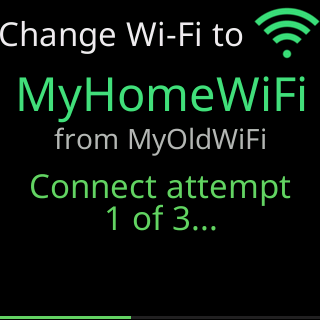
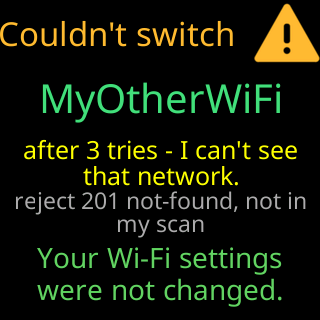
The glass showed Connect attempt / 3 of 3..., then a reason with Retrying... (2 of 3), then Couldn't join. Back on your saved Wi-Fi. and a card headed Couldn't switch with the new network’s name, the reason, and Your Wi-Fi settings / were not changed. The Change Wi-Fi page shows one of: ⚠️ I can't find “X” at this location., ⚠️ “X” let me in, but I couldn't reach the internet through it., ⚠️ “X” didn't let me on. What I saw is below, it says which part went wrong., or, for an address-only change, ⚠️ That address didn't reach anything. I'm still on “X” with the address I had. or ⚠️ The router gave me no working address. I'm still on “X” with the address I had. Under it, What I saw and a Save it anyway button.
Cause
A change is tried before it is kept: the ticker leaves its current network, tries the new one up to three times (nine seconds each), and, if the new one lets it on, checks that it can reach its server through it. Any failure puts it back on the old network with nothing changed. The page’s verdict names the step: not found (the network is not in range or is 5 GHz only), no internet (the network let it on but a sign-in page or the internet itself stood in the way), or refused (the router turned it away; see What I saw). That address didn't reach anything means the fixed address you typed does not route on this network; no join was attempted. If you cleared the boxes to go back to automatic and the router gave no address within 12 seconds, the page says ⚠️ The router gave me no working address. I'm still on “X” with the address I had., What I saw reads the router gave me no working address; kept the old one, and the old fixed address stays in use.
Fix
I can't find “X” at this location.: check the name is exact and the network runs on 2.4 GHz; move the ticker nearer that router and try again. If the network is somewhere else — the new house — useSave it anyway: Save a network for another place.“X” let me in, but I couldn't reach the internet through it.: the password is right. Check the internet works on that network from another device; if it shows a sign-in page, sign in and try again — Setup says it can't get online.“X” didn't let me on.: readWhat I saw.Router reasonlines point at the router; the commonest fix is the password — The password was refused.My radiolines point at range.That address didn't reach anything.: check the gateway and subnet against the router’s pages; see Give the ticker a fixed address.The router gave me no working address.: you were going back to automatic, so check that the router hands out addresses (DHCP is on).- Tap
Connectagain once you have fixed it.Fix it and tap Connect again. Nothing else you entered is lost.
If that didn’t work
- The ticker is on the old network throughout, so nothing is lost; the settings page works as before.
My settings are locked. Unlock them on my settings page first, then change my Wi-Fi.: unlock in the banner on the settings page, in this same browser, then open Change Wi-Fi again.- Contact with a screenshot of
What I saw.