Router settings that block new devices
Approval lists
Some routers hold every new device until someone approves it in the router’s app (“access control”, “device approval”, “MAC filtering”). To the ticker that looks like a router that lets it in and then never gives it an address, or turns it away without a reason. The setup page says:
Your router let me in, then never sent me an address to use with it. Tap Connect again first. If it keeps happening, get me and the router closer together, and check your router's app for a list that has to approve new devices.Your router turned me away without saying why. That can be the password, so check that first. Some routers also hold new devices for approval: look for access control in your router app and let me in.
Look for the ticker in the router’s app under its name, CT and three digits, and approve it.
Device limits
A router that has reached its limit of connected devices refuses the next one. The setup page says The router says it's full. and, in detail: Your router is already holding as many devices as it allows. Restart it, or remove something you no longer use, then try again.
No address handed out
A router that lets the ticker on but never answers its request for an address leaves the join half-done. If the signal is strong the page says The router let me in but never sent me an address to use with it. My signal here is strong, so distance isn't the problem. Tap Connect again, that often settles it. If the ticker has already joined and is waiting, its screen shows Almost connected with Wi-Fi is up. No IP address assigned yet. and a reason under it, DHCP server not responding or Is DHCP setup right?.

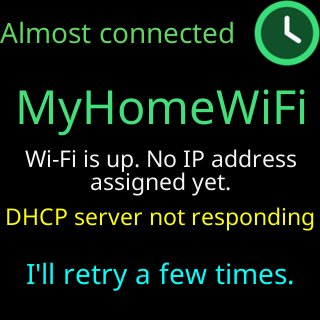
The usual fix is a router restart; the old support pages also list a router whose pool of addresses has run out, which a restart clears and the router’s DHCP settings enlarge.
Security set to WPA3 only
The ticker joins WEP, WPA and WPA2, not WPA3. A router set to WPA3 only refuses it: Your router and I could not agree on a security type. I can join WEP, WPA and WPA2 Wi-Fi, but not WPA3. Set the router to WPA2, or to WPA2/WPA3 mixed mode.
5 GHz only
A network that exists only on 5 GHz is invisible to the ticker: I can't find that network right now. Make sure it's on and in range. I can only join 2.4 GHz networks, so a 5 GHz-only one is invisible to me. Turn the 2.4 GHz band on, or pick the router’s 2.4 GHz name.
Country or channel settings
Rarely, a router refuses the ticker’s radio settings: Your router refused my radio settings. This one is rare, and usually means the router is set to a country or channel I cannot use. Setting the router’s region to your own country, and its 2.4 GHz channel to 1–11, resolves it.