Two tickers: which address is which?
- Setup page: `Or try an address I saw before` / `A ticker answered at this address once. It may be me, at an address I've since moved off — or another ticker in your home`
- The settings page that opens shows a different ticker's coins
Symptoms
The setup page offers an address under Or try an address I saw before, with the note A ticker answered at this address once. It may be me, at an address I've since moved off — or another ticker in your home. Or you open a remembered address and the page shows coins you did not choose, and it is the other ticker.

 9:41192.168.1.107
Cause
Your browser remembers the addresses tickers have answered at, keyed by each ticker’s name (CT and three digits). When it can tie an address to the ticker you are setting up, the page follows it automatically; when it cannot, it offers the address as a suggestion and never follows it by itself, because walking you into the wrong ticker is worse than making you type. Each ticker has its own address on your network, and its own name.
Fix
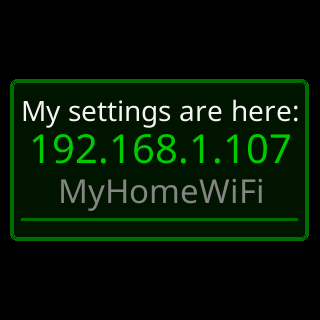
- Read the address off the ticker you want: its start screen shows
My settings are here:and the address, and its address page shows it again. Type that one. - To tell tickers apart on their pages: the setup page’s header shows
SSID:with the ticker’sCTname in setup mode, and its footer starts with the sameCTname, for exampleCT124 v2.09_ST7789_S. Every settings page’s footer shows the ticker’sMAC, different for each ticker. - If both tickers keep swapping addresses, give each a fixed address: Give the ticker a fixed address.